Posts

Showing posts with the label IDE

Enable Python interactive console in PyCharm
Image
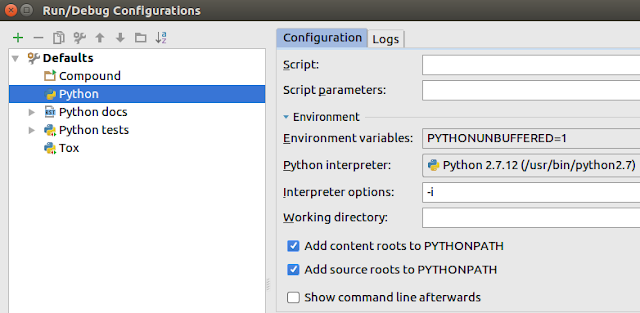
Python has an interactive console that enable to explore your code after executing the script or the   command. If you run your code without interactive option you will see this message: Process finished with exit code 0 To activate it, go to Run/Edit Configurations ... remove all configurations (to the right of plus green icon) and write -i on interpreter options from Defaults/Python . Also, you can enable  Show command line afterwards checkbox, but your script may crash with this  following error, when try to read a string from the keyboard. Exception in thread ServerThread (most likely raised during interpreter shutdown): Process finished with exit code 1 Enjoy it!

Install PyCharm Community Edition 2016.2.3 on Ubuntu with IPython/Jupyter Notebook compatibility

Image
PyCharm is another IDE for Python (in my last post I see how to install Spyder ) It has the advantage that you have multiples modes of view.  My favourite is the presentation Mode, perfect when you have a presentation and you need magnify the fonts and you need to show a on-demand code execution. Also, you can install jupyter to run ipython notebook inside the IDE.  To install PyCharm follow these commands: wget https://download-cf.jetbrains.com/python/pycharm-community-2016.2.3.tar.gz tar xvf pycharm-community-2016.2.3.tar.gz cd pycharm-community-2016.2.3/bin ./pycharm.sh Now, to install ipython and jupyter, follow these commands: sudo apt-get install ipython-notebook sudo pip install jupyter Run PyCharm and now create a new project. Now, create a new Jupyter Notebook with an ".ipynb" extension (IPYthon NoteBook): In the first cell puts: %matplotlib inline This sentence enable to display figures on th...

Install and configure Eclipse IDE to use with ns3 on Ubuntu

Image
First, you need to download Eclipse CDT (C/C++ Development Tooling): sudo apt-get install eclipse-cdt eclipse-mercurialeclipse Maybe, you will have problems to run eclispse and it will close: An extract of the log: org.osgi.framework.BundleException: The bundle "org.eclipse.equinox.simpleconfigurator_1.0.301.dist [1]" could not be resolved. Reason: Missing Constraint: Bundle-RequiredExecutionEnvironment: CDC-1.1/Foundation-1.1,J2SE-1.4 !MESSAGE Bundle initial@reference:file:plugins/org.eclipse.equinox.simpleconfigurator_1.0.301.dist.jar was not resolved. !MESSAGE Missing required capability Require-Capability: osgi.ee; filter="(|(&(osgi.ee=CDC/Foundation)(version=1.1))(&(osgi.ee=JavaSE)(version=1.4)))" To solve it, you must change your java version to other compatible with eclipse. In my case, I was using openjdk9, and I switch it for openjdk8-jre. sudo apt-get install openjdk-8-jre sudo update-alternatives --config java ...