Posts

How to enable Sphinx documentation in Pycharm

Image
Sphinx is a tool that makes it easy to create documentation. It was originally created for the new Python documentation, and enables to create it on html, LaTeX or linkcheck. See this blog for more information about Shpinx First, you need install Shpinx it on your system: pip install Sphinx Now, you need configurate the project folder from Pycharm on Tools/Sphinx Quickstart You should get this error: ReStructuredText Error  No sdk specified To solve it, use the same solution that in this previous post Now, you can compile your code to generate a html or a LaTeX file. Go to your project folder on your terminal and write: #if you want html make html #if you want LaTeX make latex If you want generate this from Pycharm, you need create an external tool. Go to  File/Settings.../Tools/External Tools/  and add the following configuration: Go to  Tools/External Tools/Generate HTML and you will see the following ...

external link opened a blank tab in chrome

This is a common problem, when you try login to your facebook account throught an external application, like Spotify Web Player for Linux As you know, create a password to use spotify stand alone (withut your facebook account) that they give you it's almost impossible. When you click to login with your facebook account, if you use chrome, it will open an empty new tab an it's impossible login in to your account. To fix it, just follow this command: rm $HOME/.local/share/applications/google-chrome.desktop Enjoy it!

Error: Cannot start process, the working directory does not exist

Image
I got this error on Pycharm Python Console. It's an error running console. To solve it, just remove .idea folder in your project and re run Pycharm. Enjoy it!

How to write a file code template in Pycharm

Image
To add utf-8 compatibility in all your scripts, one solution is enable a template that add this compatibility and other information as copyright, your name, etc. File and code templates are written in the Velocity Template Language (VTL). So you may include variables as ${YEAR}, ${USER}, etc. To add code to your scritps go to File/Settings.../Editor/File and Code Templates Select Python Script and add the following lines: #!/usr/bin/env python2 # -*- coding: utf-8 -*- # Copyright (C) ${YEAR} ${USER} Now, if you create a new Python file, it will generate with this header code by default. If you want more VTL variables please go  here Enjoy it!

How to configure Pycharm with github

Image
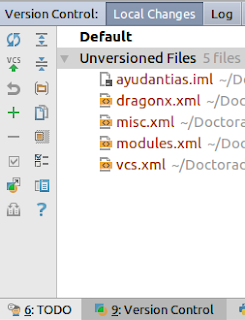
If you configured a previous project with your github account and now you try to work on it with Pycharm, yu will see this message when you'll start this IDE: Unregistered VCS root detected The directory ... is under Git, but is not registered in the Settings. Add root  Configure  Ignore Press Add root to add your folder to the git project configured on it. Go to the Version Control tab and start to add files to it with Add to VCS (or press Ctrl + Alt + A on the file) on the ChangeList catalogued as Unversioned Files.    When you are done, click on Commit Changes Now, write your Commit Message and push the Commit button and choose Commit and Push Write your github user and password and you are done. Enjoy it!

Interactive RYU controller with Postman

Image
A good way to communicate with your RYU controller is through Postman. You can find a lot of frequently curl requests on OF-DPA Ryu Rest, and you can import them to Postman. You can download them from ofdpa.com  (you need a previous registration) or download from this link Now, import them from Postman And now, enjoy it! You can use this video as tutorial

Synchronize your project with github

Image
To synchronize your project (folder) with git hub, first check connectivity with them. Create an ssh key with your github mail (the mail that you use to login) and copy it in your github account. Later check the connection. Follow these commands: apt-get install openssh-server ssh-keygen -t rsa -C "nicolas.boettcher@mail.udp.cl" cd ~/.ssh/ cat id_rsa.pub #Copy this key to your github config #Now, check connectivity to github ssh -vT git@github.com Now, create a new project on github page. To upload the content to github, follow these steps: cd $FOLDER git branch --set-upstream master origin/master git config --global user.name "$USER" git config --global user.email "$MAIL" git init #Now, add all files in your folder git add * git commit -m "$MESSAGE" git status git remote add origin https://github.com/$USER/$PROJECT_NAME git push origin master A common error is the following: ! [rejected]        master -> master (fetc...