Printing multiple files from the right-click context menu in Nautilus
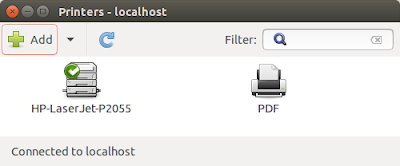
If you want print files without open them, you can use nautilus scripting. You can use your printer or a pdf printer (sudo apt-get install cups-pdf ) Go to ~/.local/share/nautilus/scripts Create a new file and call it "printer.sh" #!/bin/bash # # pdf-printer.sh # # Print files from the right-click context menu in Nautilus. # Place this script in ~/.local/share/nautilus/scripts. # The printer to use (as shown in the Printer Configuration # gui or in /etc/cups/printers.conf). printer=HP-LaserJet-P2055 echo "$NAUTILUS_SCRIPT_SELECTED_FILE_PATHS" | while read file do lpr -P "$printer" "$file" done exit 0 In printer value, you can choose your favorite one with the same name that you see in your printers. Now give execution permission to the file (chmod +x printer.sh) and restart nautilus. If you click on a document, now you can see it as follows (In my case I created 2 printers):